
AI Automation Academy
Free download
From zero to your first AI agent
The n8n workflow from the video, as one file. It picks its own tool, then books the appointment or sends the email.

Marty VaughnAI Agents on YouTube
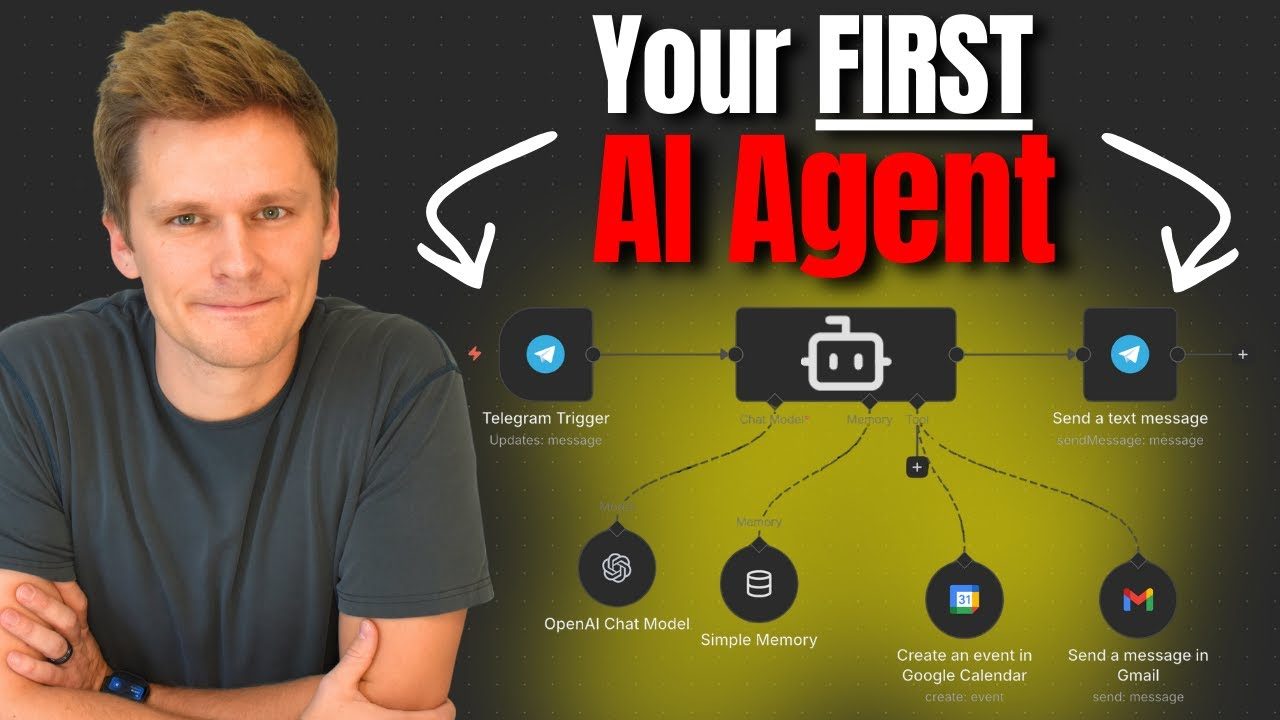
Just watched the n8n build? This is the finished workflow from it. The agent, the model, the memory, the Gmail tool, the Google Calendar tool, and the Telegram trigger, wired up exactly as they were at the end of the video, with every credential stripped out so you connect your own.
What makes this an agent and not a chatbot
A chatbot answers. You send it something, it sends words back, and whatever happens next is your job. That is most of what people have been calling AI for the last two years, and it is why a lot of people have quietly decided the whole thing is overrated.
An agent is given tools and the freedom to choose between them. This one has two: it can send an email and it can put an event on a calendar. Nothing tells it which to use. You write a sentence, it works out what you are asking for, picks the tool, fills in every field itself, and then goes and does it. Ask it to book something and it never touches your inbox. Ask it for both in one message and it does both.
You (in Telegram):
      Hi, please book an appointment to play disc golf
      tomorrow morning at 9:00 am. Then send an email to
      Jaden telling him about it. His email is
      andromedusai@gmail.com

Agent:
      Your appointment is booked for tomorrow at 9:00 am
      and I have sent Jaden an email about it.

      Created an event in Google Calendar
Sent a message in GmailWhat is in the file
- The agent itself, with the system message written on camera: what each tool is for, when not to reach for it, how to sign an email, and the one line that tells the model what time it is right now, which is what makes "tomorrow at nine" land on the right day.
- The model and the memory. GPT-4.1 mini with web search turned on, so it can answer things that happened this morning, and a memory window so a follow-up question knows what the last one was about.
- Both tools, already wired. Gmail and Google Calendar, with their fields set to be filled in by the model rather than by you.
- The Telegram trigger and reply, which is what puts the agent in your pocket instead of in a browser tab.
What you can do with it once it runs
- Text it like a person. "Book a call with Sam Thursday at 2." It reads the message, works out the start and end time, writes the title and the description, and puts it on your calendar.
- Have it write and send. "Email Jaden and tell him the invoice is out." It composes the email and sends it, signed the way you told it to sign.
- Add a third tool, then a fourth. This is the point of starting here. The agent does not change when you add one; you plug in Slack, or Sheets, or a phone call, describe it in the system message, and it starts choosing between three.
What you need
An n8n account, which has a free trial and is where the workflow lives. An OpenAI API key, which is the only part that costs anything: it is billed by usage, and $5 of credit goes a very long way at the model this uses. A Google account for Gmail and Calendar. Telegram, if you want to talk to it from your phone, and you can skip that and use n8n's own chat panel instead.
Connecting Google is the slowest step and it is the one that stops people. There is a five minute video that walks through it, and the Telegram one is under two minutes. Both are linked on the next page.
What it costs to run
Cents. The model this uses is the cheap one on purpose, because nothing here needs a deep thinker: it is reading one short message and deciding between two tools. Add $5 to your OpenAI balance and you will be testing this for months. n8n's own plan is the other cost and it starts free.